
RootHide Bootstrap Jailbreak
RootHide Bootstrap jailbreak is available for iOS 14- iOS 17 running devices such as A8 to A17, including M1 and M2 chips.
It is Procursus-based semi-jailbreak, created by the RootHide development team. So this is called RootHide jailbreak too. You can install jailbreak tweaks using Sileo or Zebra without needing a full jailbreak.
Download RootHide Bootstrap IPA
Now Bootstrap 1.2.4 latest version is available to download. It’s required to TrollStore or TrollStore 2 to install the Bootstrap. Because RootHide bootstrap comes with a .tipa file that works with the TrollStore.
How to install Bootstrap Jailbreak
Step 01 – First install the TrollStore2 on your iPhone or iPad.
Step 02 – Once you have TrollStore 2 installed, open Safari and visit this page and the above button to download the Bootstrap IPA.
Step 03 – Tap the Bootstrap.tipa file. It is available under the latest release.

Step 04 – Then, tap the Download button in the pop-up prompt and then tap the downloads button in the URL bar.
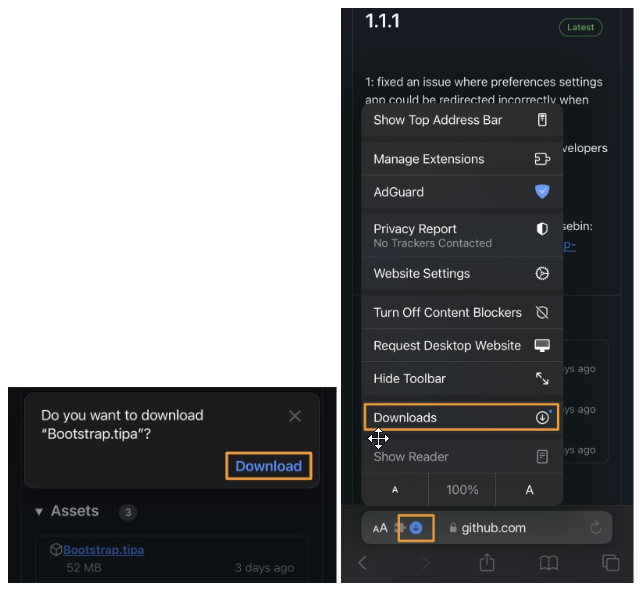
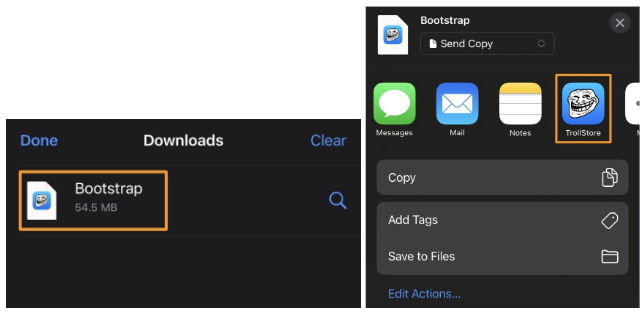
Step 05 – Tap the Downloads option in pops up menu, then Tap the Bootstrap file downloaded from the Downloads sheet > Share button > TrollStore icon in the Share sheet.
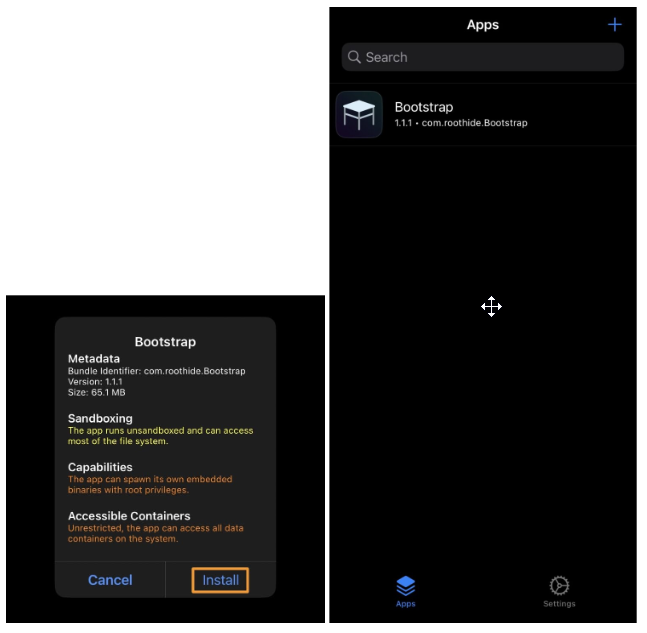
Step 06 – Click the Install button from prompt: The RootHide bootstrap will now appear in the TrollStore app’s installed list.
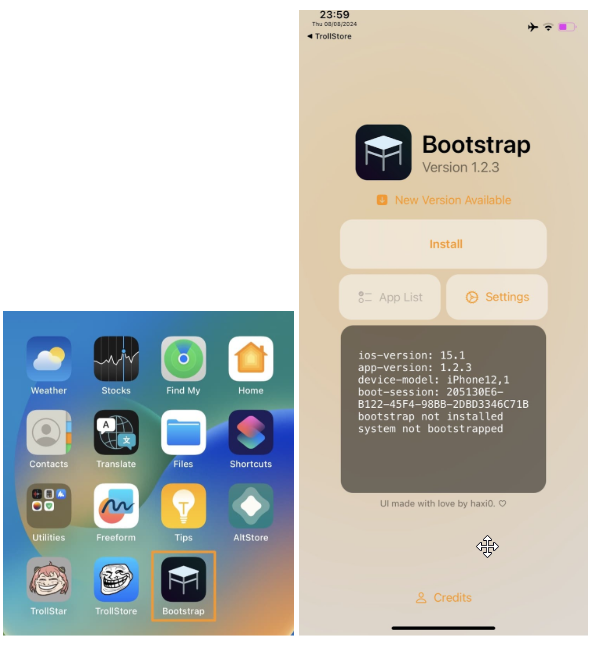
Step 07 – Now check your device homescreen. RootHide bootstrap app is available on Home Screen. Tap the Install button: Once install process begins, you will see a pop-up that says “Bootstrapping” until it completes.
Step 08 – Now you need to set a password in the Set Password prompt, enter it twice, and tap Set.

Step 09 – Now your device will reboot and you will have the Sileo and Zebra package manager apps on your Home Screen: Now you have installed the RootHide bootstrap on your iPhone or iPad.

Compatibility
iOS versions : iOS 17, iOS 16.6.1, iOS 16.6, iOS 16.5.1, iOS 16.5, iOS 16.4.1, iOS 16.4, iOS 16.3.1, iOS 16.3, iOS 16.1, iOS 16.0.3, iOS 16.0.2, iOS 16, iOS 15.6.1, iOS 15.6, iOS 15.5, iOS 15.4.1, iOS 15.4 , iOS 15.3.1, iOS 15.3, iOS 15.2.1. iOS 15.2, iOS 15.1.1, iOS 15.1, iOS 15.0.2 , iOS 15.0.1, iOS 15
iOS 14 – iOS 14.8.1 also supported
Note – Not compatible with all the iOS 17 versions starting iOS 17.1, all the iOS 18 versions starting iOS 18 and all the iOS 26 starting iOS 26.
iOS devices : iPhone 14, iPhone 14 Plus, iPhone 14 Pro, iPhone 14 Pro Max, iPhone 13, iPhone 13 Mini, iPhone 13 Pro, iPhone 13 Pro Max, iPhone 12, iPhone 12 Mini, iPhone 12 Pro, and iPhone 12 Pro Max, iPhone 11 Pro Max, iPhone 11 Pro, iPhone 11, iPhone Xs, iPhone Xs Max, iPhone XR, iPhone X, iPhone 8, iPhone 8 Plus, iPhone SE
More about Bootstrap
Installing Tweaks Without a Full Jailbreak – You can use Sileo or Zebra to install jailbreak tweaks on your device without having to go through the full process of jailbreaking. This means you can still customize and enhance your apps with tweaks, but without committing to a complete jailbreak.
Direct Tweak Injection – With this setup, you can inject jailbreak tweaks directly into specific apps. This allows you to modify apps with jailbreak features without having to fully jailbreak your device, making the process simpler and less risky.
Bootstrap vs. Full Jailbreak – While Bootstrap allows you to install certain jailbreak tweaks, it’s not the same as a full jailbreak. A full jailbreak unlocks your entire device for customization, while Bootstrap only gives you partial access, letting you add tweaks but with some limitations.
RootHide Bootstrap’s Limitations – RootHide bootstrap doesn’t support systemwide changes like a full jailbreak does. For example, it can’t inject tweaks into the Home Screen, Lock Screen, or other system-wide areas like a complete jailbreak would allow.
TrollStore 2 Requirement – Before you can start using the Bootstrap, you need to have TrollStore 2 installed on your device. This is a necessary step, as the Bootstrap relies on TrollStore to function properly.
Using RootHide Bootstrap at Your Own Risk – It’s important to be aware that using the RootHide bootstrap comes with some risks. Since it’s not a full jailbreak, there might be some limitations or issues, and you’re responsible for any potential problems that arise.
Manually Enabling Tweak Injection – By default, tweaks aren’t automatically applied to apps when using Bootstrap. If you want to enable tweak injection, you need to go into the Bootstrap app and navigate to the “AppEnabler” section. From there, you can choose which apps should have tweaks applied to them.
Tweak support for Bootstrap
Bootstrap is great for improving many apps, but it doesn’t currently work with certain tweaks that change things like the Home Screen, Lock Screen, Control Center, and StatusBar. If you try to install one of these tweaks, you might see a message that says “Not Updated,” which means the tweak needs to be updated to work with Bootstrap.
You can use a tool called Patcher, which you can get through Sileo to fix this. When installing a tweak, choose the “Convert” option and pick the Patcher app. This tool can help make tweaks work with Bootstrap, either by converting them directly or by using something called the rootless compat layer. If the direct conversion doesn’t work, try using the rootless compat layer instead. Just remember that you’ll need to install rootless-compat as a requirement for this method.
Bootstrap semi-jailbreak supported tweaks list
Please note that not all jailbreak tweaks are compatible with Bootstrap semi-jailbreak. Followings are the latest jailbreak tweak list supported with Bootstrap semi jailbreak. It has mentioned the repo name that you can download the jailbreak tweak too.
● 3DAppVersionSpoofer > RootHide’s Repo
● AdvancedBrightnessSlider > Havoc Repo
● Akara > Chariz Repo
● Alpine > Havoc
● Alpine > Havoc
● Always120 > Havoc Repo
● Ambre > PoomSmart’s Repo
● App Hider > BigBoss Repo
● App Library Disabler > BigBoss
● AppColorClose > PoomSmart’s Repo
● AppData > RootHide’s Repo
● ArtFull > Havoc
● Atria > Chariz
● AutoBrightnessToggle (CCSupport) > ichitaso repository
● AutoUnlockX > SparkDev
● BackgrounderAction15 (CCSupport) > Akusio repo
● Badger > Havoc
● BatteryBuddy > vyolit
● BetaAlertRemove > .deb file in releases
● betterAlarm > Chariz
● BoldersReborn > Chariz
● CAHighFPS > PoomSmart’s Repo
● Cardculator > Havoc
● Cask3 > Chariz
● CC On & Off > RootHide’s Repo
● CCMusicArtwork > SparkDev
● CCPowerMenu > MTAC’s Repo
● CCSupport > RootHide’s Repo
● CCVibration > BigBoss
● CCVPN > BigBoss
● CloseAll > Havoc
● ColorBar15 > DTCalabro’s Repo
● ColorMyBattery > RootHide’s Repo
● covertCK > CreatureCoding
● Cthulhu > BigBoss
● CustomizeCC > Havoc
● Designer > JunesiPhone
● DLEasy > Havoc
●Dodo > Ginsu Tweaks
●DownloadBar13 > alias20
●DynamicPeninsula > Limneos Repo
● Ellekit > RootHide’s Repo
● Eneko > vyolit
● Everest > Havoc
● EZSwipe > RootHide’s Repo
● FakeSignalBar > alias20
● FingerLock > Havoc
● Five Icon Dock > RootHide’s Repo
● Gravitation > HackYouriPhone
● HideSerialNumber > ichitaso repository
● IconOrder > Havoc
● IconRotation > ETHN’s Repo
● iKSettings > iKarwan
● iNstaKiller > iKarwan
● InstaLauncher 2 > Havoc
● Jade > Chariz
● KrashKop > Havoc
● Laetus > SparkDev
● LocationService (CCSupport) > ichitaso repository
● Lynx 2 > Havoc
● MoreLinesNotifications > BigBoss
● NewTerm 3 Beta > RootHide’s Repo
● NoDockGround > RootHide’s Repo
● NoMoreDisabled > BigBoss
● NotiCopy15 > iCraze’s Repo
● NotRecording > RootHide’s Repo
● NowPlayingIconXVI > Havoc
● OTADisabler > ichitaso repository
● PanCake > AnthoPak’s Repo
● PinAnim > Havoc
● PowerSelector > ichitaso repository
● QuickActions > Chariz
● ReachPlayer > ETHN’s Repo
● RecordPause > PoomSmart’s Repo
● Rune > Havoc
● Senri > Chariz
● ShowTouch > RootHide’s Repo
● Shuffle > CreatureCoding
● SmartBattery iOS 15-16 > Havoc
● SmartNetwork iOS 15-16 >Havoc
● Snapper 3 > Havoc
● SnowBoard > SparkDev
● Spectrum > alias20
● Speedster > Havoc
● StatusFolder > BigBoss
● Stella > Havoc
● Trim (saw for rootless) > iGerman
● TweakSettings > CreatureCoding
● Uptime > RootHide’s Repo
● Velvet 2 > Chariz
● WifiQR > BigBoss
● YouTubeKiller > iKarwan